Price: $18
15 GB
DataCenter Proxy
Unit price: $1.22 /GB
Sign up to purchase


Use residential IPs to view local products, prices and web pages. Rotate your IP between tasks or keep the same IP for a continuous session.
Residential IPs suit tasks that need a local residential network, such as price comparisons, ad checks and market research. Select a location and test the target page before scaling up.
From $1.11 / GB
Compatible with Scrapingbypass API V1, V2(s)
City-level targeting for local, real-time data
Supports HTTP and SOCKS5 proxy protocols
No monthly fee; proxy traffic never expires
Works with third-party scrapers, crawling scripts, anti-detect browsers and bulk overseas account registration
Get Started API Proxy Access
Residential IPs suit tasks that need a local residential network, such as price comparisons, ad checks and market research. Select a location and test the target page before scaling up.
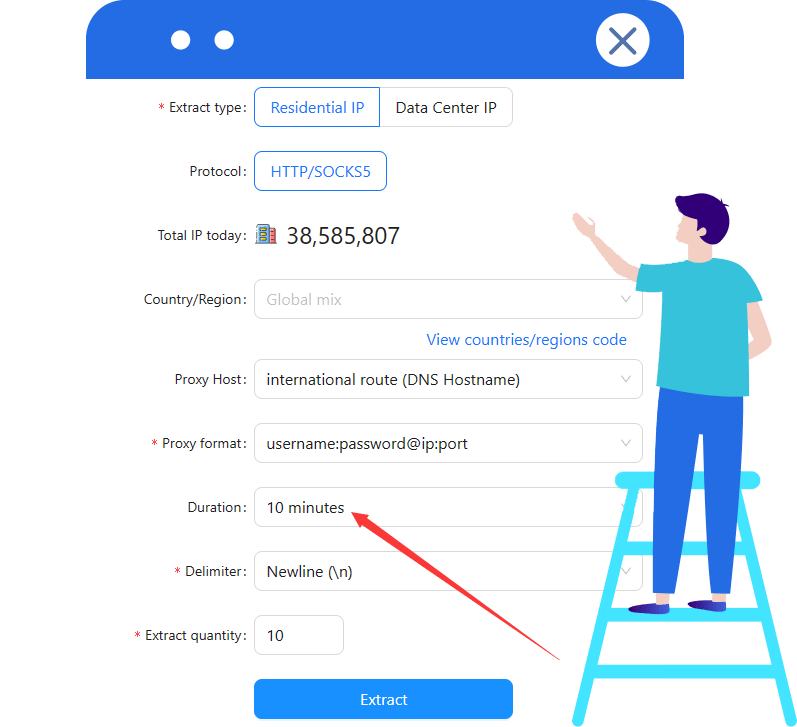
Select a same-IP session in the console and choose an available duration. Keep that IP during login or verification. When used with API V2(s), follow the documentation and keep the IP stable for at least 10 minutes.


Configure a proxy for ordinary page requests. If a supported Cloudflare, DataDome or Imperva challenge remains, connect the matching API. A proxy alone is not a verification-handling service.
Datacenter IPs suit larger request queues where traffic cost matters. Test whether your target accepts datacenter IPs, then increase your workload as needed.
Starting at $0.35/GB
Unit price: $1.22 /GB
Sign up to purchaseUnit price: $1.04 /GB
Sign up to purchaseUnit price: $0.88 /GB
Sign up to purchaseUnit price: $0.69 /GB
Sign up to purchaseUnit price: $0.61 /GB
Sign up to purchaseUnit price: $0.53 /GB
Sign up to purchaseUnit price: $0.43 /GB
Sign up to purchaseUnit price: $0.35 /GB
Sign up to purchaseResidential IPs suit tasks that need a local residential network, such as price comparisons, ad checks and market research. Select a location and test the target page before scaling up.
Starting at $1.11/GB
Unit price: $2.57 /GB
Sign up to purchaseUnit price: $2.29 /GB
Sign up to purchaseUnit price: $1.86 /GB
Sign up to purchaseUnit price: $1.63 /GB
Sign up to purchaseUnit price: $1.51 /GB
Sign up to purchaseUnit price: $1.40 /GB
Sign up to purchaseUnit price: $1.29 /GB
Sign up to purchaseUnit price: $1.11 /GB
Sign up to purchase
Choose a GB package for your workload. Uploads and downloads through the proxy deduct from your traffic balance as you use them.
Rotate IPs between separate tasks. Keep one IP for logins, verification and continuous browsing so the session does not change identity midway.
Choose an available country or city in the console to view local products, prices, ads and search results. Check the actual exit location before collecting data.
Paste the proxy address and credentials from the console into your browser, scraper or application. HTTP and SOCKS5 are supported.
Use a small test to check the page, location and IP settings. Once the result fits your task, increase your workload gradually.
Buy a traffic package without monthly renewal. Unused proxy traffic stays available for later tasks.
Choose residential or datacenter proxies and a GB package for your workload.
Choose location, protocol and IP rotation or same-IP settings, then generate a proxy address.
Paste the address and credentials into your tool. Test the target page before starting the full task.
Configure a proxy for ordinary page requests. If a supported Cloudflare, DataDome or Imperva challenge remains, connect the matching API. A proxy alone is not a verification-handling service.
Residential proxies use residential-network IPs for tasks that need a local IP context, such as price comparisons, ad checks and research. Datacenter proxies use server-network IPs for bulk tasks that accept them. Test your target before choosing.
No. Separate tasks can use rotating IPs; logins, verification and continuous browsing normally need one stable IP and consistent cookies.
Select a currently available country or city in the console. Locations can differ by product, so check the available options and actual exit location.
No. Proxy uploads and downloads deduct from your GB balance. If you additionally use an API for website verification, its credits are billed under the API rules.
No. Access depends on the target website, IP location, request frequency and session settings. Test first; if verification remains, check whether a supported API is needed.
Paste the proxy address and credentials from the console into your browser, scraper or application. HTTP and SOCKS5 are supported.
Select a same-IP session in the console and choose an available duration. Keep that IP during login or verification. When used with API V2(s), follow the documentation and keep the IP stable for at least 10 minutes.
Buy a traffic package without monthly renewal. Unused proxy traffic stays available for later tasks.
Find the key steps to get proxies, configure connections and integrate your tools.
Get your proxy address and credentials before connecting.
Understand IP changes, session duration and supported protocols.
Understand traffic usage or integrate proxies into your application.
Explore these tools when a website asks for verification or you need automated collection.
Explore Cloudflare and DataDome verification APIs.

Connect proxies, verification APIs and collection tasks with OpenClaw.
Explore automation